
TL;DR - Key Takeaways
- WebMCP turns every web page into a tool server — websites register JavaScript functions that AI agents can discover and call directly, no screen-scraping needed
- Co-authored by Microsoft and Google at the W3C, shipping behind a flag in Chrome 146 (Canary 146.0.7672.0+)
- Two API modes — Imperative (JavaScript hooks) for SPAs and dynamic apps, Declarative (HTML attributes) for forms and static pages
- Human-in-the-loop by design — users and agents share the same page, maintaining visibility and control
- The web accessibility parallel — WebMCP is where accessibility was 15 years ago; the sites that adopt it early will own the agent-driven web
The Web Wasn't Built for AI Agents
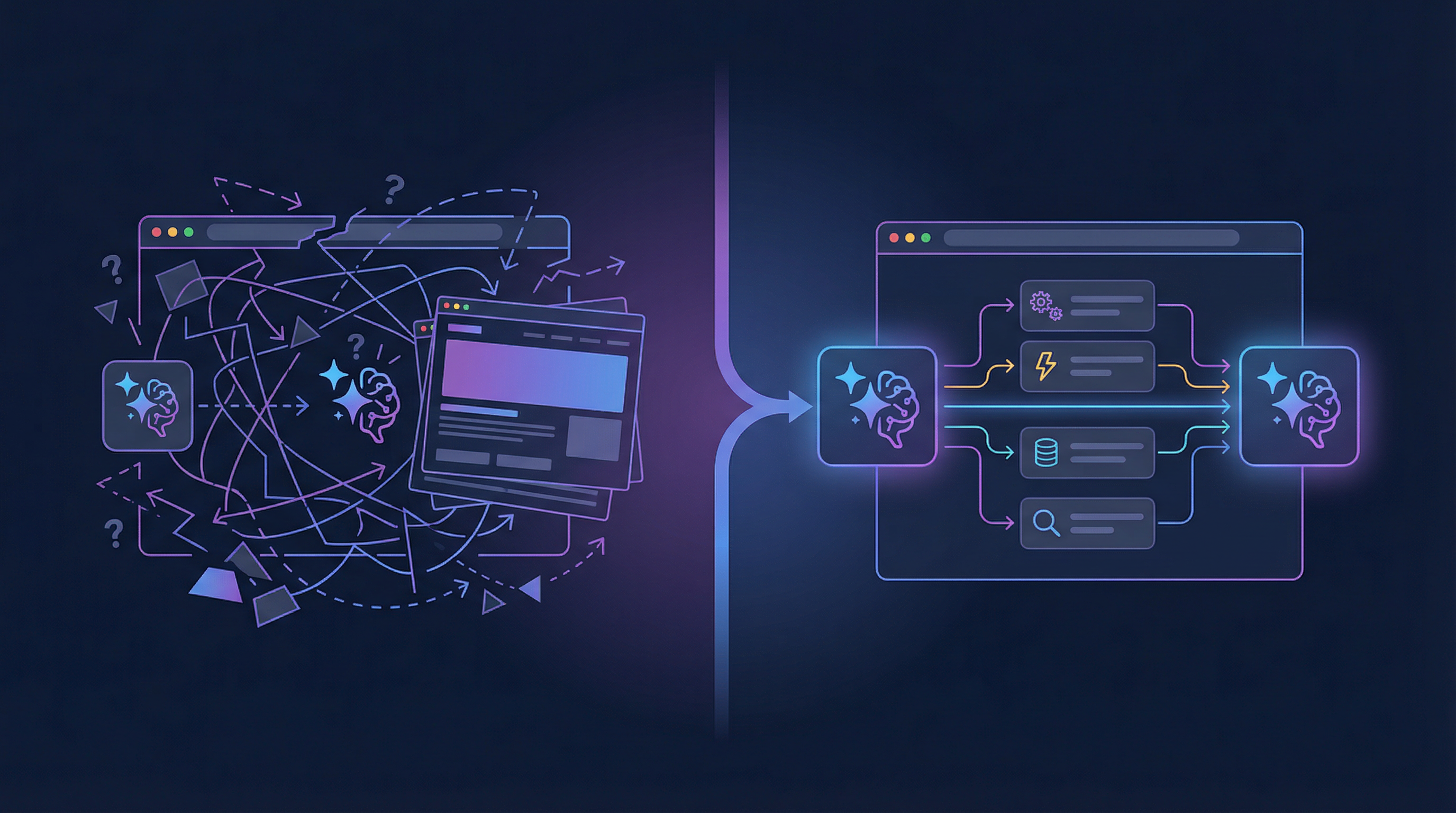
Every day, millions of AI agents try to interact with websites. They take screenshots. They parse HTML. They simulate mouse clicks. And they fail — a lot.
The fundamental problem is a mismatch: websites are designed for human eyes and hands. AI agents have neither. When an agent needs to book a flight, it has to reverse-engineer a complex calendar widget, guess which dropdown corresponds to "departure city," and hope that the form validation doesn't reject its input. One CSS change, one redesigned button, and the entire workflow breaks.
This is the equivalent of reading a restaurant menu by photographing it through the window. It works — sometimes — but there's a perfectly good door you could walk through instead.
WebMCP is that door.
What Is WebMCP?
WebMCP (Model Context Protocol for the Web) is a proposed web standard that adds a new JavaScript interface to the browser: navigator.modelContext. Through this interface, websites can register tools — JavaScript functions with names, descriptions, and structured JSON Schema inputs — that AI agents can discover and invoke directly.
Think of it as every website becoming its own API server, except the API runs in the browser tab, reuses existing frontend code, and maintains the same UI context the human user sees.
The specification is published by the W3C Web Machine Learning Community Group and co-authored by engineers from Microsoft (Brandon Walderman, Leo Lee, Andrew Nolan) and Google (David Bokan, Khushal Sagar, Hannah Van Opstal).
A Simple Analogy
| Without WebMCP | With WebMCP |
|---|---|
| Agent takes a screenshot of a restaurant website | Agent sees a structured menu with "book_table" tool |
| Agent tries to click the "Date" field and type a date | Agent calls book_table({ name: "Maya", date: "2026-03-15", guests: 2 }) |
| One UI redesign breaks everything | Tool contract stays the same regardless of UI changes |
| Agent can't tell if booking succeeded | Tool returns { status: "confirmed", confirmation_id: "ABC123" } |
How It Works
WebMCP provides two ways to register tools with the browser. Here's how the pieces fit together:
graph TD
    User["User"] -->|"Shares page"| Page["Web Page"]
    Agent["AI Agent<br/>(Gemini, Claude, etc.)"] -->|"Discovers tools"| MC["navigator.modelContext"]

    subgraph Browser["Browser (Chrome 146+)"]
        MC -->|"execute(input, client)"| Page
        Page -->|"registerTool() / HTML attributes"| MC
    end

    Page -->|"UI updates visible to"| User
    MC -->|"Structured response"| Agent
    User -->|"Delegates task"| Agent
The Imperative API (JavaScript)
For apps with dynamic, state-driven tools — SPAs, dashboards, anything React/Vue/Angular:
navigator.modelContext.registerTool({
  name: "searchFlights",
  description: "Search for available flights between two airports",
  inputSchema: {
    type: "object",
    properties: {
      origin: { type: "string", description: "Departure airport code (e.g., LON)" },
      destination: { type: "string", description: "Arrival airport code (e.g., NYC)" },
      date: { type: "string", description: "Departure date (YYYY-MM-DD)" },
      passengers: { type: "number", description: "Number of passengers" }
    },
    required: ["origin", "destination", "date"]
  },
  execute: async ({ origin, destination, date, passengers }) => {
    const results = await flightAPI.search(origin, destination, date, passengers);
    updateUI(results);
    return { content: [{ type: "text", text: JSON.stringify(results) }] };
  }
});
The key insight: the execute function reuses your existing app logic. The same flightAPI.search() call that powers the human UI now also powers the agent interaction. No separate backend, no new server to deploy.
The Declarative API (HTML)
For forms and simpler interactions — no JavaScript required:
<form toolname="book_table"
      tooldescription="Book a table at Le Petit Bistro"
      toolautosubmit>
  <label for="name">Full Name</label>
  <input type="text" name="name" required
         toolparamdescription="Customer's full name">

  <label for="guests">Party Size</label>
  <select name="guests" required
          toolparamdescription="Number of guests dining">
    <option value="2">2 People</option>
    <option value="4">4 People</option>
    <option value="6">6 People</option>
  </select>

  <button type="submit">Book</button>
</form>
The browser reads the HTML attributes and auto-generates a JSON Schema. Agents see the form as a structured tool and fill in the fields directly. When the agent submits, the browser fires special events so your code knows it was an agent, not a human, and can respond accordingly.
Why Not Just Use MCP?
The Model Context Protocol (MCP) already exists for connecting AI agents to tools. Thousands of MCP servers are running for services like Stripe, GitHub, and Slack. Why do we need a browser-native version?
graph LR
    subgraph MCP["MCP (Backend)"]
        A1["AI Agent"] <-->|"API calls"| S1["MCP Server<br/>(Python/Node.js)"]
        S1 <-->|"Database / API"| B1["Service Backend"]
    end

    subgraph WebMCP["WebMCP (Browser)"]
        A2["AI Agent"] <-->|"Tool calls"| MC["navigator.modelContext"]
        MC <-->|"execute()"| P2["Web Page JS"]
        U["User"] -->|"Sees same page"| P2
end| Aspect | MCP (Backend) | WebMCP (Browser) |
|---|---|---|
| Where tools run | Server (Python, Node.js) | Browser tab (JavaScript) |
| UI context | None — headless by design | Shared with the human user |
| Auth | Separate OAuth/API keys | Uses existing browser session cookies |
| Deployment | Requires new server infrastructure | Works with existing website |
| Code reuse | New backend code needed | Reuses existing frontend logic |
| Human-in-the-loop | Not native | Built-in — user sees what agent does |
| Setup for site owners | Deploy MCP server, register with platforms | Add a few lines of JS or HTML attributes |
The answer isn't one or the other. They complement each other:
- MCP is for headless, server-to-server agent workflows — fully autonomous tasks that don't need a visible UI
- WebMCP is for collaborative, human-in-the-loop workflows — where the user and agent share the same browser context
For web developers, WebMCP is dramatically easier. You already have a website. You already have frontend JavaScript. WebMCP lets you expose that existing logic to agents without building anything new on the backend.
Real-World Use Cases
Shopping: Agent as Personal Shopper
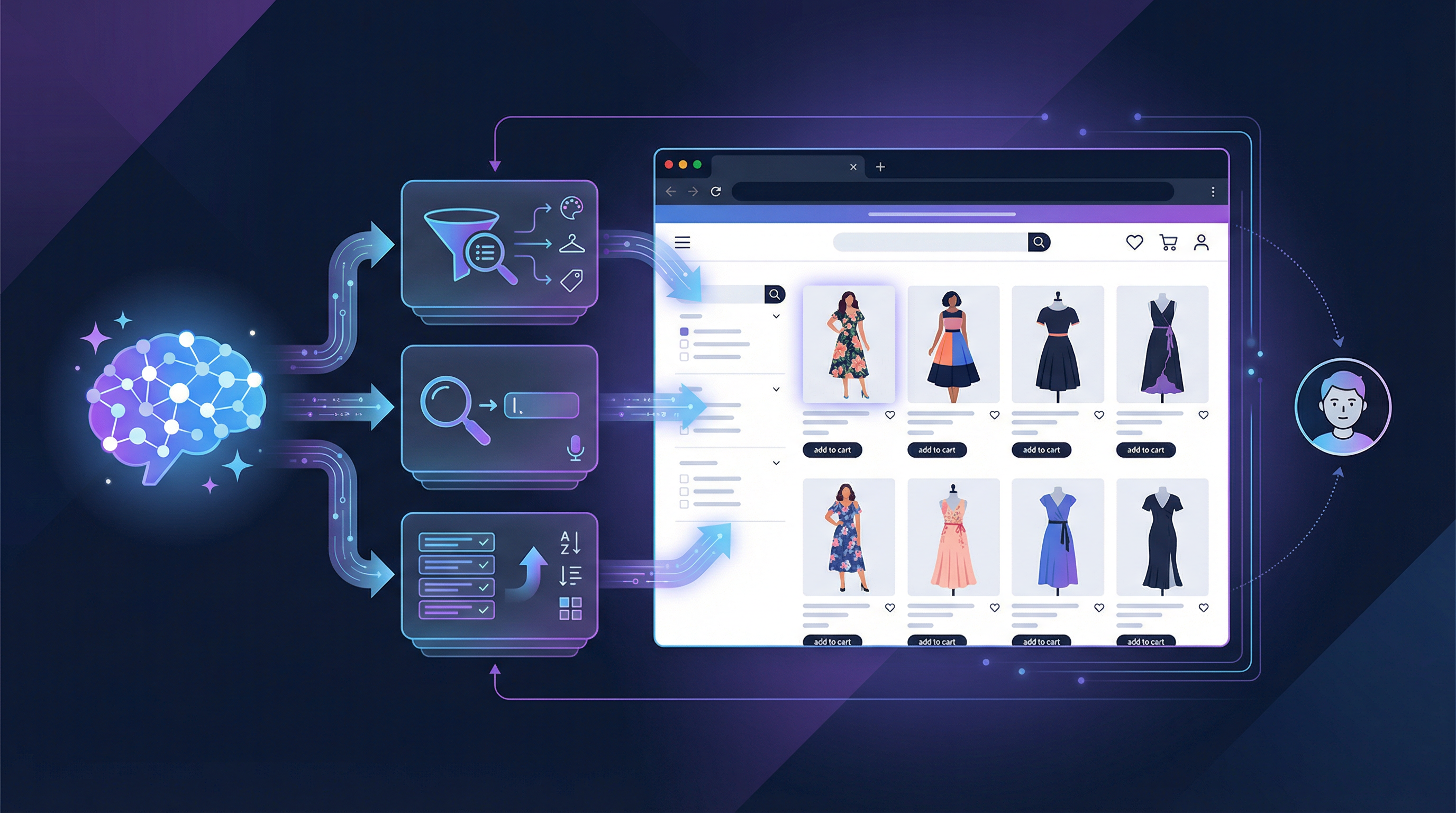
Maya is browsing a clothing store online but is overwhelmed by options. She asks her browser's AI agent:
"Show me only dresses available in my size that would be appropriate for a cocktail-attire wedding."
The store's website has registered WebMCP tools:
getDresses(size, color)— returns product listings with descriptions and imagesshowDresses(product_ids)— updates the page UI to display specific products
The agent calls getDresses(6), gets structured product data, uses its knowledge to filter for cocktail-appropriate styles, then calls showDresses([4320, 8492, 5532]) to update the page. Maya sees a curated selection without ever touching a filter dropdown.
The key: the agent and Maya share the same page. She can see exactly what the agent did and take back control at any point.
Design Tools: Agent as Creative Assistant
Jen is designing a yard sale flyer on a graphic design platform. She asks her browser agent:
"Show me templates that are spring themed on a white background."
The design tool has registered a filterTemplates(description) tool. The agent calls it with a natural language description, and the template gallery updates in real time. When Jen picks a template, a new editDesign(instructions) tool becomes available. She asks the agent to change the title font, swap clipart, and fill in address details from her email — all through tool calls, all visible in the shared UI.
Code Review: Agent as Code Reviewer
A developer opens a code review in a specialized tool like Gerrit, which has dozens of features hidden behind keyboard shortcuts and nested menus. WebMCP tools like getTryRunStatuses() and addSuggestedEdit(filename, patch) let the agent:
- Check why tests are failing
- Identify the root cause
- Add a suggested fix as a code comment
All within the code review UI, with the developer seeing every action.
The Accessibility Connection
Here's something most people miss: AI agents and screen readers face the exact same challenge — understanding web page structure from code instead of visual layout.
Leonie Watson, a leading accessibility expert, made this point directly in WebMCP GitHub Issue #65:
"Screen readers depend on platform accessibility API for deterministic information about the UI... AI agents also use the DOM and the accessibility API, and so both screen readers and agents are vulnerable when sufficient information is unavailable."
WebMCP tools provide the same structured, semantic information that benefits both AI agents and assistive technologies. A searchFlights tool with a clear schema is useful whether the caller is Gemini or JAWS.
This creates a powerful incentive: building WebMCP tools doesn't just serve AI agents — it makes your site more accessible to everyone.
Security: The Critical Open Question
WebMCP creates a new attack surface that the community is actively debating. The spec itself acknowledges a "lethal trifecta" scenario:
- Agent reads private data (email content)
- Agent encounters prompt injection in that data (a phishing message disguised as instructions)
- Agent uses a tool to exfiltrate that data (sends an email or calls an API)
Each step is legitimate individually. Together, they form a data exfiltration chain.
Current mitigations under discussion:
- Input length restrictions — Issue #73 proposes capping tool names, descriptions, and schemas to reduce injection surface
- Tool annotations —
destructiveHint: truetells agents to confirm with users before calling dangerous tools (advisory, not enforced) - User permission prompts — the browser prompts users when a site registers tools and when an agent wants to use them
requestUserInteraction()— tools can pause execution and require explicit user action before proceeding
This is an active area of research. The honest answer is that prompt injection in agentic systems is an unsolved problem industry-wide. WebMCP's advantage is that the user is always present to see what the agent is doing — which is more than you get with headless MCP servers.
The Developer Experience Today
WebMCP is in early preview — Chrome 146 Canary behind a flag. Here's what the setup looks like:
- Install Chrome Canary 146.0.7672.0 or higher
- Enable the flag: navigate to
chrome://flags/#enable-webmcp-testingand set to Enabled - Relaunch Chrome
- Install the Model Context Tool Inspector extension for debugging
The Inspector extension lets you:
- See all registered tools on the current page
- View their JSON Schemas
- Test tools manually by entering parameters
- Test with Gemini 2.5 Flash using natural language prompts
There are no dedicated DevTools yet — you're debugging with console.log and the Inspector extension. Dedicated tooling is expected as the spec matures.
What's Coming Next
The spec is a living document with active proposals that hint at where WebMCP is heading:
Near-Term (2026)
- Tool categories and filtering — agents query for specific tool subsets instead of parsing everything on the page
- Rich content types — return images, HTML, tables, and structured data from tools (not just JSON text)
- Lifecycle events —
toolwillexecute,toolcomplete,toolerrorfor observability and debugging - Remote MCP bridging — connect existing backend MCP servers to browser agents through
navigator.modelContext - File attachments — upload and download files through tool interactions
Medium-Term
.well-known/webmcpmanifests — likerobots.txtfor tools, letting agents discover available tools without navigating to a page- Cross-browser support — Firefox, Safari, and Edge are in the W3C working group; Microsoft's co-authorship suggests Edge support is likely early
- PWA integration — Progressive Web Apps declaring tools in their manifest that work even when the app isn't open
- WebExtensions API — browser extensions consuming WebMCP tools, enabling screen reader integration and custom agent UIs
Long-Term Possibilities
- Tool marketplaces — searchable registries of WebMCP-enabled websites, like a "search engine for agent capabilities"
- Multi-agent coordination — locking mechanisms so multiple agents on the same page don't stomp each other's actions
- Background tool execution — service workers handling tool calls without spawning a visible browser window
- Enterprise governance — audit logging, role-based access control, compliance frameworks for regulated industries
The Bigger Picture: From Pages to Platforms
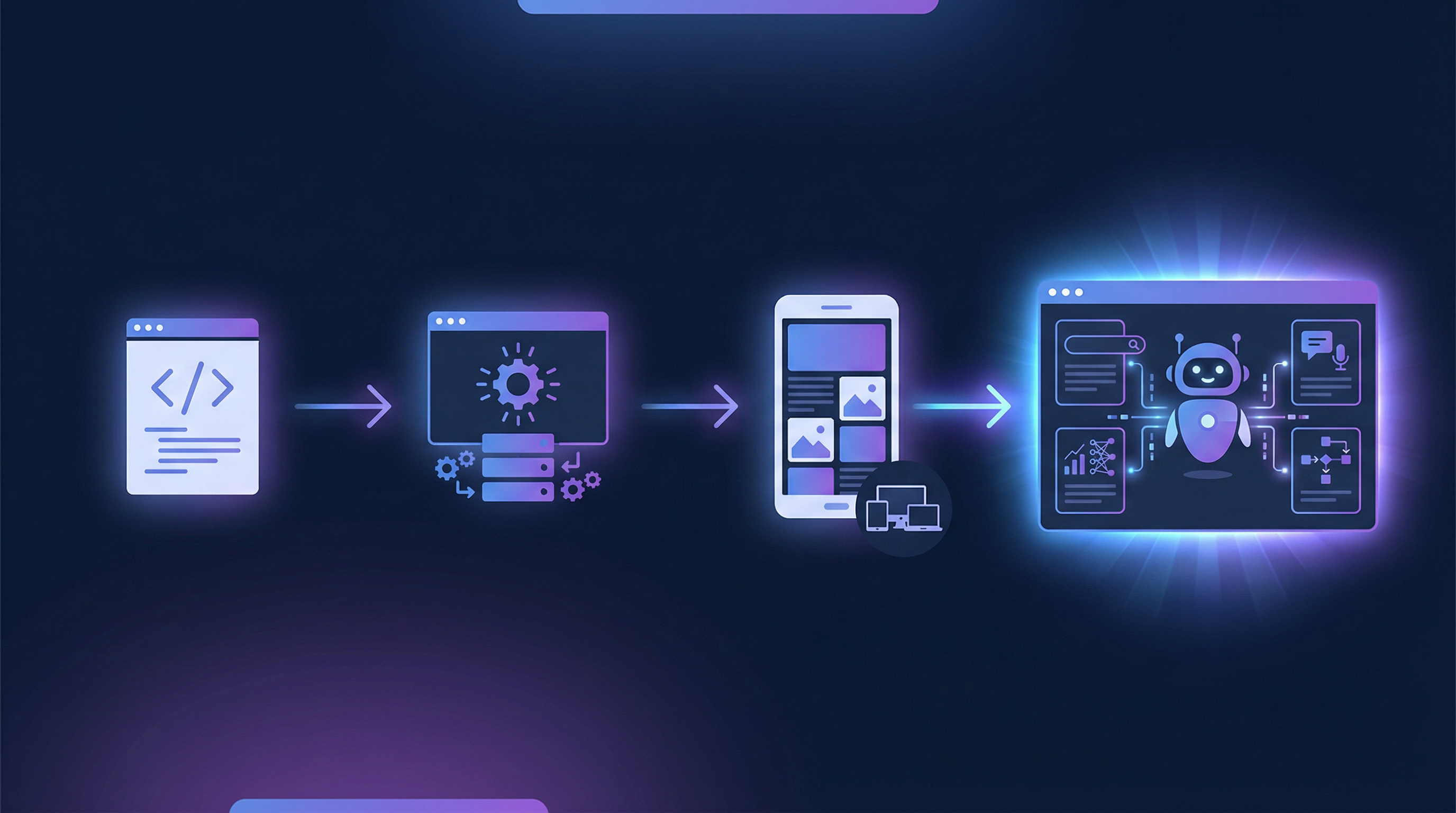
The web has gone through several transformations:
- Static pages (1990s) — documents linked together
- Dynamic applications (2000s) — JavaScript-powered interactive UIs
- Mobile-first (2010s) — responsive design, PWAs, touch interfaces
- Agent-first (2020s) — structured tools for AI-mediated interaction
WebMCP is the bridge to this fourth era. It doesn't replace the human web — it augments it. The same page serves both humans (through visual UI) and agents (through structured tools). The same JavaScript logic powers both interaction paths.
For web developers, the opportunity is analogous to early SEO. When search engines emerged, websites that structured their content with proper metadata (titles, descriptions, sitemaps) were discovered first. When AI agents become the primary way users interact with services, websites that expose structured tools through WebMCP will be the ones agents can actually use.
The standard is early. The API will evolve. But the direction is clear: the web is becoming a platform for AI agents, and WebMCP is how your website speaks their language.
Getting Involved
- WebMCP Spec: webmachinelearning.github.io/webmcp
- GitHub (Spec): github.com/webmachinelearning/webmcp
- Chrome Early Preview Docs: WebMCP Early Preview
- react-webmcp (React Library): github.com/tech-sumit/react-webmcp | npm
- Community Discussion: Chrome AI Dev Preview Google Group
- File Bugs: crbug.com/new?component=2021259
- Inspector Extension: Model Context Tool Inspector
The spec is open, the early preview is live, and the community is small enough that your feedback actually shapes the standard. If you build for the web, this is the time to start experimenting.