
TL;DR - Key Takeaways
- Google's FunctionGemma 270M is a tiny Gemma 3 model designed for function calling — but the base version produces almost zero valid tool calls on unseen schemas
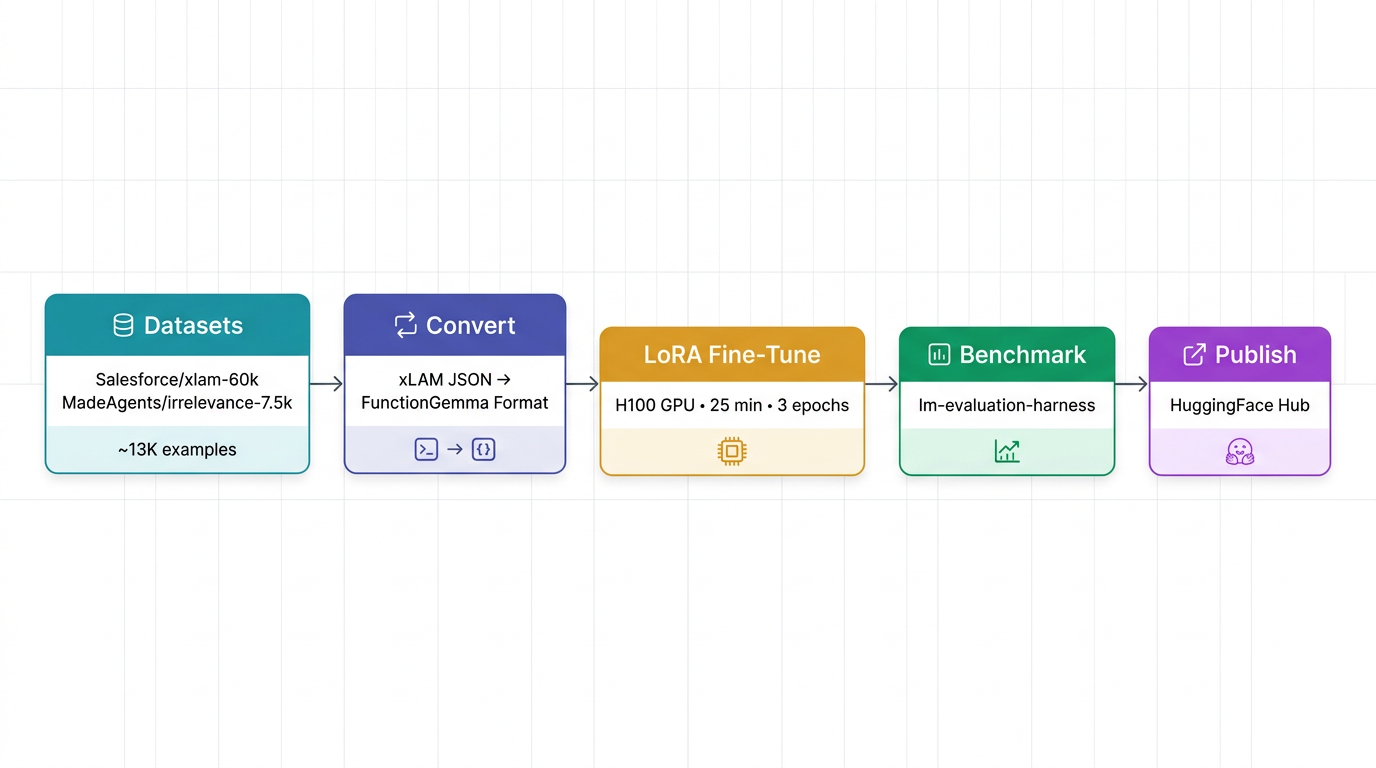
- LoRA fine-tuning on ~13K general function-calling examples (Salesforce xLAM-60k + MadeAgents irrelevance data) took 25 minutes on an H100 GPU via vast.ai
- Benchmarked with
lm-evaluation-harness: +29% tool selection accuracy, +39% first tool accuracy, +20% parameter accuracy - End-to-end through a multi-protocol tool agent: 14% → 57% tool selection on a 7-query evaluation
- The fine-tuned model is published on HuggingFace and the agent code is on GitHub
- At 270M parameters, the model is strong on simple tool schemas but struggles with 14+ complex tools — a 3B+ model would be the next step
The Problem: Small Models Can't Call Tools
Function calling — where a language model decides which API or tool to invoke and with what arguments — is one of the most practical capabilities for AI agents. Models like GPT-4, Claude, and Gemini handle it natively. But what about models small enough to run on a phone, a Raspberry Pi, or an edge device?
Google released FunctionGemma, a 270M parameter variant of Gemma 3, specifically designed for function calling. It uses a unique control-token format:
<start_of_turn>user
You are a model that can do function calling with the following functions

{"name": "get_weather", "parameters": {"city": "string"}}

What's the weather in Tokyo?<end_of_turn>
<start_of_turn>model
<start_function_call>call:get_weather{city:<escape>Tokyo<escape>}<end_function_call><end_of_turn>
The idea is compelling — a model small enough to run anywhere, structured enough to call tools reliably. But there's a catch: the base model barely works on unseen tool schemas. In my testing, it produced zero valid function calls for common queries like "What's the weather?" or "Send an email."
So I decided to fine-tune it.
Training Pipeline
The full pipeline from raw data to published model looks like this:
Datasets
I combined two public datasets from HuggingFace, filtered to general-purpose function calling:
| Dataset | Source | Sampled | Purpose |
|---|---|---|---|
| Salesforce/xlam-function-calling-60k | HuggingFace | 10,000 | General function calling across diverse tools |
| MadeAgents/xlam-irrelevance-7.5k | HuggingFace | 3,000 | Negative examples — queries where no tool is applicable |
The combined dataset totals ~13,000 examples spanning categories like ToolBench, xLAM-60k, OpenFunctions, and irrelevance/refusal samples.
Format Conversion
The datasets ship in xLAM-2's ChatML format (JSON arrays of tool calls). FunctionGemma expects a completely different format with Gemma 3 turn markers and special control tokens. A conversion script transforms each example:
xLAM-2 input:
[{"name": "get_weather", "arguments": {"city": "Tokyo", "unit": "celsius"}}]FunctionGemma output:
<start_function_call>call:get_weather{city:<escape>Tokyo<escape>,unit:<escape>celsius<escape>}<end_function_call>The conversion handles edge cases: multi-tool calls (multiple <start_function_call> blocks), no-tool responses (plain text), and nested argument values. Examples that can't be cleanly converted are dropped.
Training Configuration
Base Model
unsloth/functiongemma-270m-it — Gemma 3 architecture, 270M parameters, instruction-tuned. This is the smallest model in the Gemma family with function-calling support.
LoRA Configuration
Rather than full fine-tuning (which would require retraining all 270M parameters), I used LoRA (Low-Rank Adaptation) to train a lightweight adapter that modifies the model's attention and feed-forward layers:
| Parameter | Value |
|---|---|
| Rank (r) | 16 |
| Alpha | 32 |
| Dropout | 0.05 |
| Target modules | q_proj, k_proj, v_proj, o_proj, gate_proj, up_proj, down_proj |
| Trainable parameters | ~2.4M (< 1% of total) |
| Task type | CAUSAL_LM |
Infrastructure
| Resource | Detail |
|---|---|
| GPU | NVIDIA H100 SXM 80GB |
| Provider | vast.ai (cloud GPU rental) |
| Training time | 25 minutes |
| Epochs | 3 |
| Batch size | 8 (effective 16 with gradient accumulation 2) |
| Learning rate | 2e-4 |
| Max sequence length | 1,024 tokens |
| Framework | HuggingFace TRL (SFTTrainer) + PEFT |
Training Metrics
| Metric | Value |
|---|---|
| Final train loss | 0.6503 |
| Final eval loss | 0.6921 |
| Token accuracy | 85.7% |
| Throughput | 24 samples/sec |
| Best checkpoint | Step 2,000 (of 2,196) |
Benchmark Results
I benchmarked both the base and fine-tuned models using two complementary approaches.
lm-evaluation-harness (Standardized Benchmark)
Using EleutherAI's lm-evaluation-harness with custom task definitions for function calling:
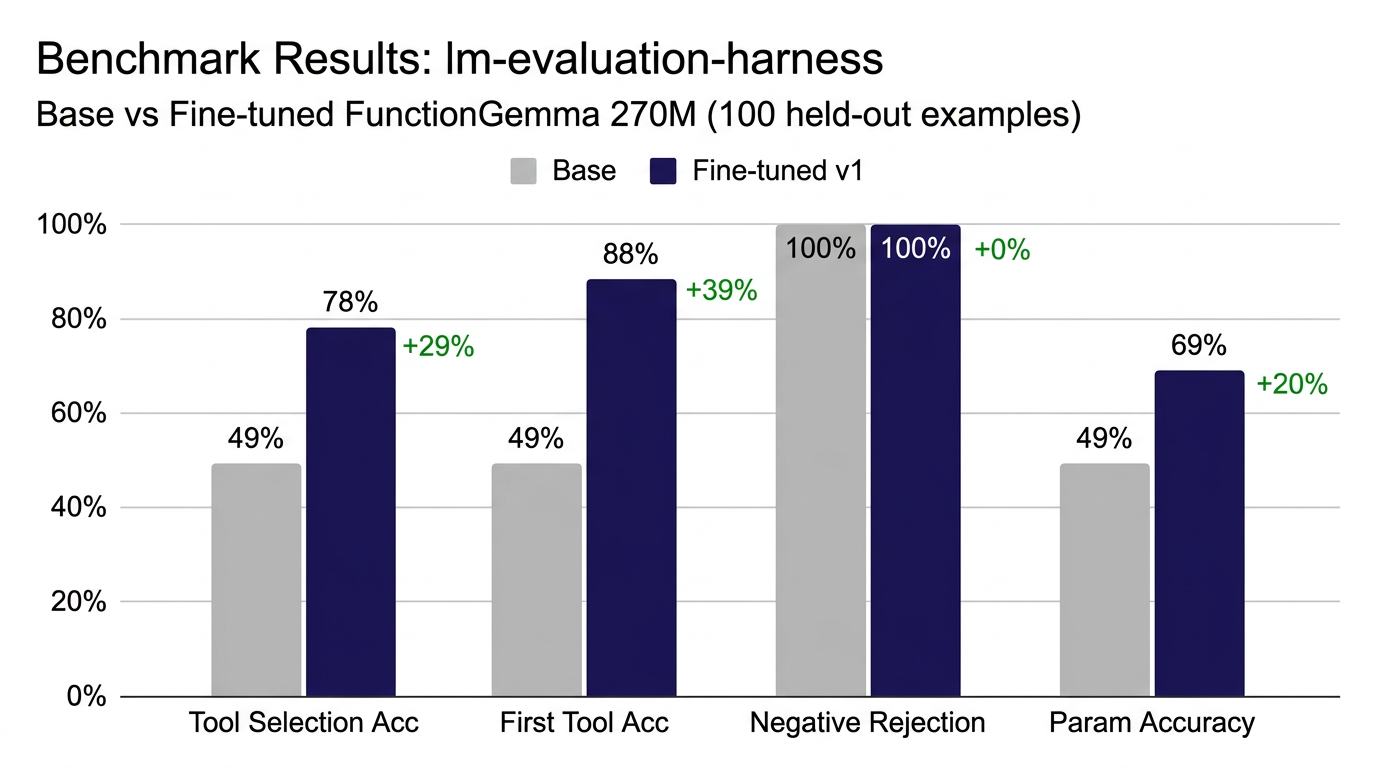
The fine-tuned model nearly doubles tool selection accuracy and achieves 88% first-tool accuracy — meaning when it picks a tool, it picks the right one almost 9 out of 10 times.
End-to-End Through the Tool Agent
The real test: running both models through the actual tool agent pipeline with real tool schemas and natural language queries.
| Query | Base (270M) | Fine-tuned v1 |
|---|---|---|
| "What's the weather in Tokyo?" | No output | get_weather(city="Tokyo") |
| "Search for latest news about AI" | No output | search_web(query="artificial intelligence") |
| "Send email to john@example.com..." | No output | send_email(to="john@example.com", subject="Meeting", body="See you at 3pm") |
| "What is 234 * 567 + 89?" | No output | search_web (wrong — expected calculate) |
| "Remind me to call dentist at 9am" | No output | send_email (wrong — expected set_reminder) |
| "Weather in Paris in fahrenheit?" | No output | get_weather(city="Paris") |
| "Tell me a joke" | No output (correct) | search_web (wrong — should decline) |
| Metric | Base | Fine-tuned | Delta |
|---|---|---|---|
| Tool Selection Accuracy | 1/7 (14%) | 4/7 (57%) | +43% |
| Avg inference time | 2.21s | 2.72s | +0.51s |
The base model produced zero valid tool calls. It never generated the <start_function_call> tokens at all. The fine-tuned model correctly selects tools for weather, search, and email queries, with properly extracted arguments (city names, email addresses, subjects).
Tool Agent Architecture
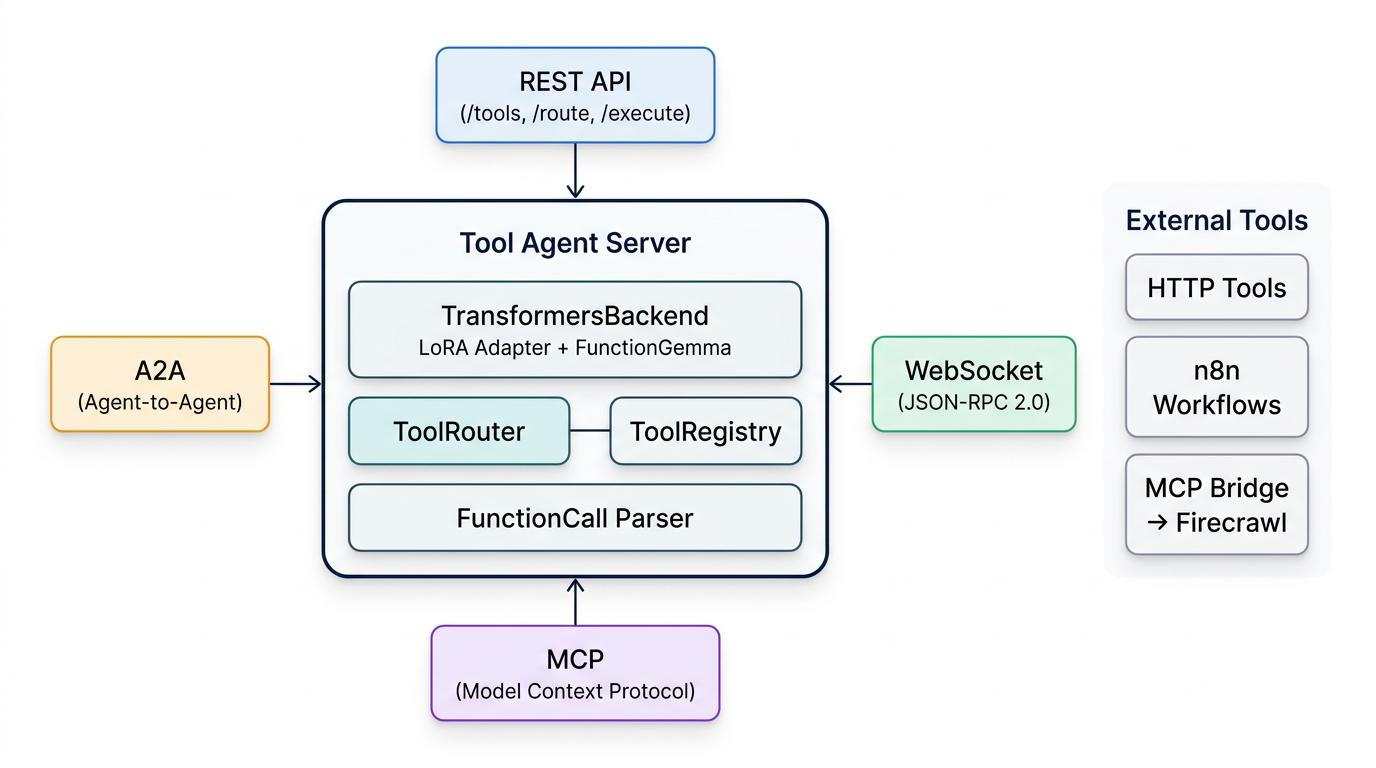
The fine-tuned model runs inside a multi-protocol tool agent server that exposes four connectivity options:
Protocol Support
| Protocol | Endpoint | Use Case |
|---|---|---|
| REST API | /tools, /route, /execute |
Standard HTTP integration |
| WebSocket | /ws (JSON-RPC 2.0) |
Streaming, real-time clients |
| MCP | /mcp |
Model Context Protocol — tool discovery for AI agents |
| A2A | /a2a, /.well-known/agent-card.json |
Google's Agent-to-Agent protocol |
Loading the Fine-tuned Model
The TransformersBackend automatically detects LoRA adapters by looking for adapter_config.json in the model directory. It reads the base model path from the config, loads it, and merges the adapter:
model_dir = Path(model_path)
adapter_cfg = model_dir / "adapter_config.json"
if adapter_cfg.exists():
    cfg = json.loads(adapter_cfg.read_text())
    base_model = cfg["base_model_name_or_path"]
    # Load base model
    model = AutoModelForCausalLM.from_pretrained(base_model)
    # Merge LoRA adapter
    model = PeftModel.from_pretrained(model, str(model_dir))
    model = model.merge_and_unload()
It also detects FunctionGemma models and switches to the legacy prompt format with Gemma 3 turn markers instead of the standard ChatML template:
def _build_prompt(self, user_message, tools):
    tools_text = format_tools(tools)
    return (
        f"<start_of_turn>user\n"
        f"You are a model that can do function calling "
        f"with the following functions\n\n{tools_text}\n\n"
        f"{user_message}<end_of_turn>\n"
        f"<start_of_turn>model\n"
    )
The FunctionCall.parse() method handles both the legacy FunctionGemma control tokens and standard JSON arrays, so the same router works regardless of which backend is active:
# Legacy format
<start_function_call>call:get_weather{city:<escape>Tokyo<escape>}<end_function_call>

# JSON format (xLAM-2, Gemini, etc.)
[{"name": "get_weather", "arguments": {"city": "Tokyo"}}]
Running It
# With the fine-tuned model
TOOL_AGENT_BACKEND=transformers \
TOOL_AGENT_MODEL=./models/finetuned \
python -m agent.server

# With Gemini API (for comparison)
TOOL_AGENT_BACKEND=gemini \
GEMINI_API_KEY="..." \
python -m agent.server
Testing with Firecrawl MCP
To stress-test the model, I connected it to Firecrawl's MCP server, which exposes 12 web scraping tools (scrape, crawl, search, extract, browser sessions, etc.). Combined with the built-in HTTP tools, the model had to choose from 14 tools total.
The 270M model struggled here. When asked to "Scrape https://example.com," it selected firecrawl_browser_create instead of firecrawl_scrape and passed wrong argument types. For search and crawl queries, it gave up entirely.
This isn't surprising: the model has never seen these specific tool schemas during training, and at 270M parameters, it doesn't have enough capacity to generalize from "I know how to call get_weather" to "I can figure out which of 14 complex tools with nested parameters to use."
The same queries work perfectly when routed through Gemini 2.5 Flash Lite via the same agent — confirming the architecture is solid and only the model size is the bottleneck.
What I Learned
Fine-tuning works, even at 270M parameters. The base model produced zero valid tool calls. After 25 minutes of LoRA training on an H100, it correctly selects tools 57% of the time on unseen schemas. The lm-evaluation-harness benchmarks show even stronger results: +29% tool selection, +39% first-tool accuracy.
The FunctionGemma format is viable. The control-token approach (<start_function_call>call:fn{key:<escape>val<escape>}) is clean, parseable, and distinct enough from natural text that the model rarely produces false positives. The FunctionCall.parse() handler processes both legacy and JSON formats transparently.
270M is too small for complex registries. With 5 simple tools, the model does well. With 14 tools (including Firecrawl's complex schemas with nested objects and optional parameters), it falls apart. A 3B+ model fine-tuned on the same data would likely handle it.
LoRA adds negligible overhead. The adapter merge happens once at load time (+0.5s). Inference speed is identical to the base model after merging — there's no runtime cost.
Argument extraction is the model's strength. When it picks the right tool, it extracts arguments accurately: city names from weather queries, email addresses from send requests, search terms from search queries. The training data clearly teaches argument mapping well.
Next Steps
- Scale up: Fine-tune a 3B or 8B Gemma model on the same dataset to handle complex tool registries
- GGUF export: Convert the adapter to GGUF format for Ollama deployment (currently only supported via Transformers backend)
- Domain-specific training: Add n8n workflow tools and custom API schemas to the training data
- Multi-turn support: Extend training to handle tool results and follow-up calls
Links
Model & Code
- Fine-tuned model (HuggingFace): sumitagrawal/functiongemma-270m-tool-agent
- Tool Agent source code (GitHub): tech-sumit/tool-agent
- Base model: unsloth/functiongemma-270m-it
Training Data
- Salesforce/xlam-function-calling-60k — general function calling
- MadeAgents/xlam-irrelevance-7.5k — negative/refusal examples
Frameworks & Tools
- HuggingFace TRL — SFTTrainer for supervised fine-tuning
- PEFT — LoRA adapter training
- lm-evaluation-harness — standardized benchmarking
- vast.ai — cloud GPU rental (H100)
- FastAPI — tool agent server framework
- Firecrawl — MCP-based web scraping tools