
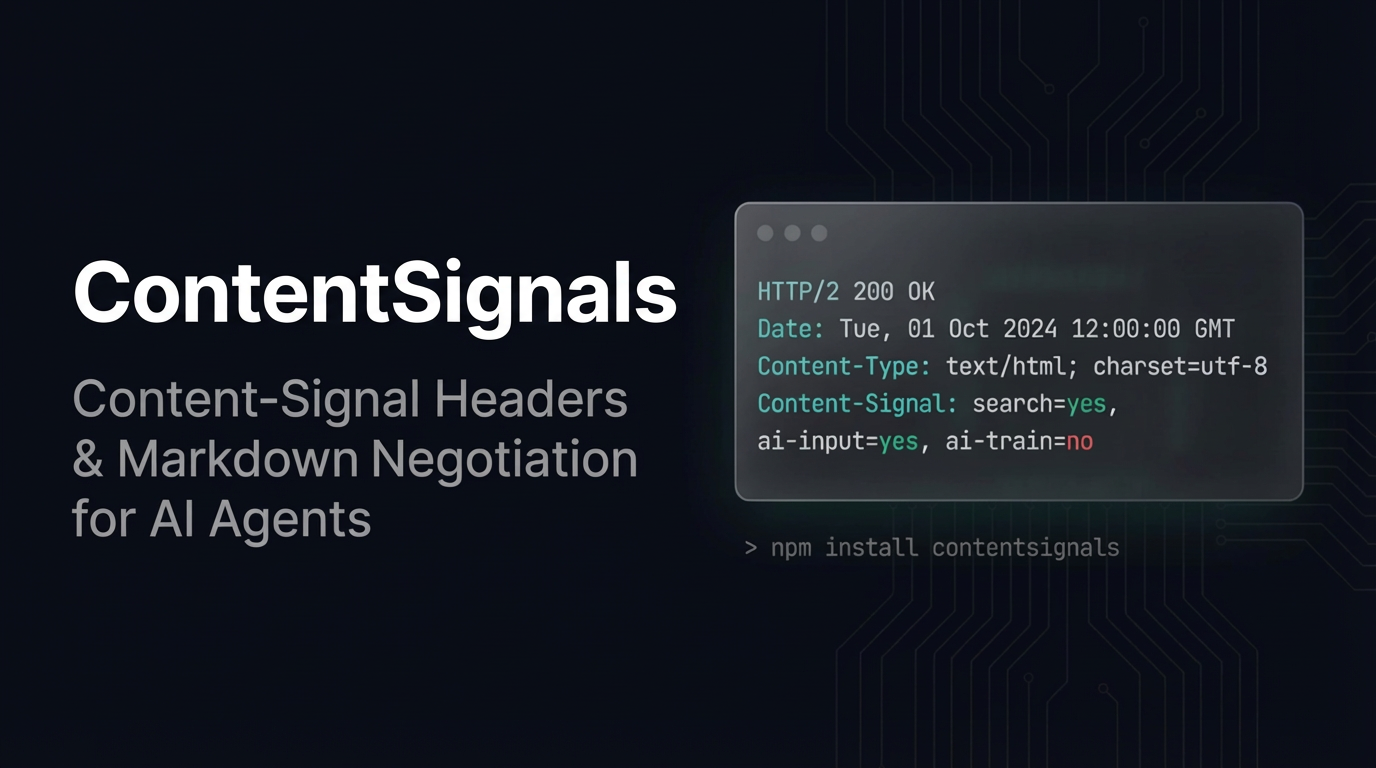
TL;DR - Key Takeaways
- AI agents are crawling the web, but there's no standard way to tell them "use this for search, not for training" —
robots.txtis too coarse for that - Content-Signal is a new HTTP header spec that gives per-response, granular control over what AI agents can do with your content: search indexing, RAG/grounding, and model training
- ContentSignals is a Node.js middleware that adds Content-Signal headers, serves markdown to agents via content negotiation, and reports token counts — all from one
app.use()call - Works with Express, Fastify, Hono, Next.js, and plain Node.js — standard
(req, res, next)signature, ~7 KB bundle - Open source, MIT licensed, TypeScript-first with full type declarations
The Problem: robots.txt Was Never Built for AI
Every website has a robots.txt. It tells search crawlers which URLs they can visit. It was designed in 1994 for a world where "crawling" meant one thing: building a search index.
That world is gone.
In 2026, AI agents crawl your site for at least three distinct purposes — and robots.txt treats them all the same:
| Purpose | What it means | Example |
|---|---|---|
| Search indexing | Build a searchable index, show pages in results | Google, Bing, Perplexity |
| AI input (RAG/grounding) | Feed your content into a model at inference time for real-time answers | ChatGPT browsing, Gemini grounding, Claude tool use |
| AI training | Use your content to train or fine-tune model weights | GPT-5 training, open-source model datasets |
robots.txt can't distinguish between these. It's all-or-nothing per URL: allow the crawler, or block it. You can't say "index this page for search, use it for grounded AI answers, but don't train on it." You either give away full access or shut the door completely.
The Content Signals specification fixes this by defining a per-response HTTP header: Content-Signal.
What Is Content-Signal?
Content-Signal is an HTTP response header that tells AI agents exactly what they can do with a given response. It has three fields:
Content-Signal: search=yes, ai-input=yes, ai-train=no| Field | Meaning |
|---|---|
search |
Allow building a search index and providing search results |
ai-input |
Allow real-time retrieval for AI models — RAG, grounding, generative answers |
ai-train |
Allow using this content to train or fine-tune model weights |
Each field is yes or no, set per response. A blog post might allow all three. An API endpoint might block everything. A product page might allow search and RAG but block training. You express these distinctions per-route, per-response — something robots.txt was never designed to do.
Think of it as moving from a single front-door lock to per-room key cards.
Real-World Signal Configurations
Different content types call for different policies. Here's how a typical site might configure Content-Signal across its pages:
| Page Type | search |
ai-input |
ai-train |
Rationale |
|---|---|---|---|---|
| Blog posts | yes | yes | no | Discoverable in search, usable for grounded AI answers, but not for training models on your writing |
| Product pages | yes | yes | yes | Maximum visibility — let agents recommend your products |
| API docs | yes | yes | no | Developers and agents should find them, but model training on your API design isn't helpful |
| User-generated content | yes | no | no | Show in search, but don't let agents reproduce user content in AI answers |
| Paywalled articles | no | no | no | Paid content should stay behind the paywall |
| Admin/internal pages | no | no | no | No AI access to internal tools |
ContentSignals: The Middleware
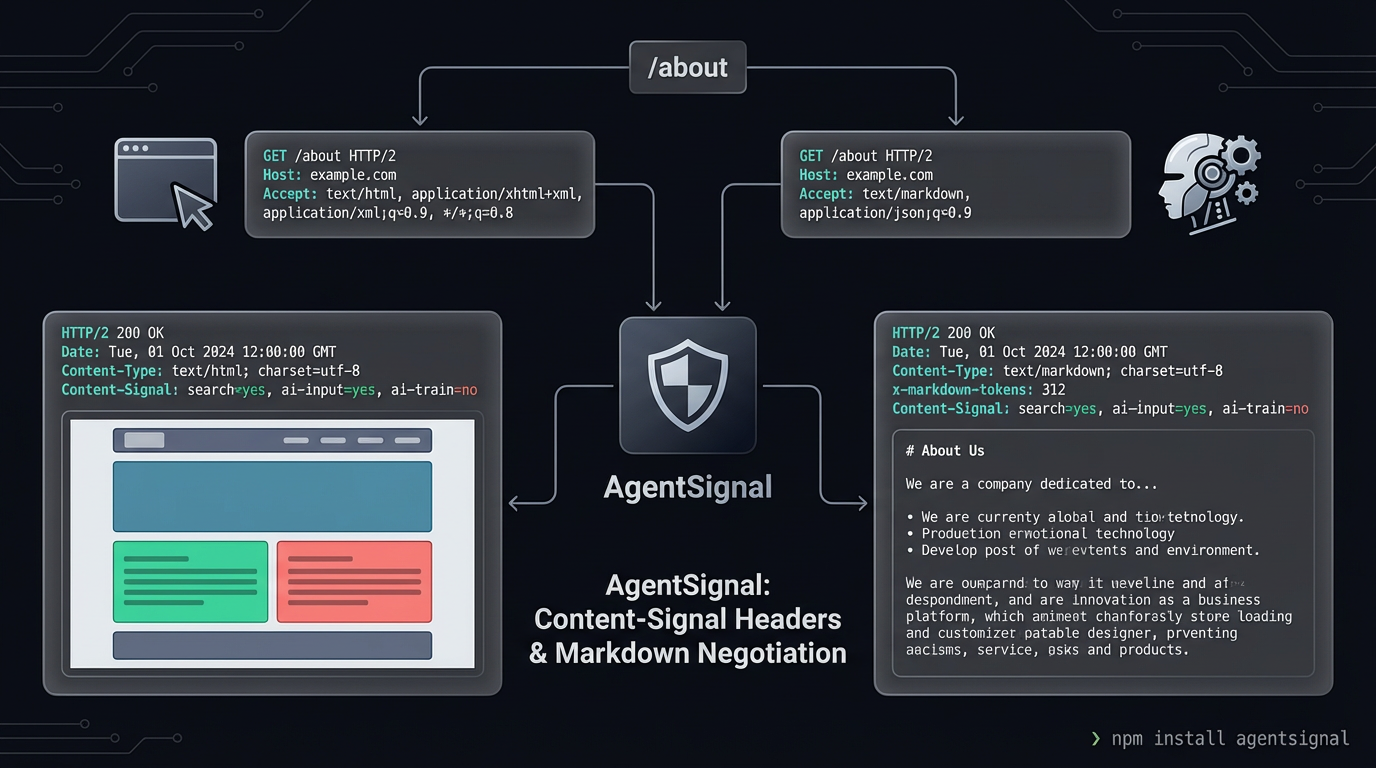
ContentSignals is a Node.js middleware that implements three behaviors from a single app.use() call:
1. Content-Signal Headers (every response)
Every HTTP response gets a Content-Signal header and a Vary: Accept header. Your policy travels with every response, not buried in a root-level text file.
2. Content Negotiation (when agents request markdown)
When an AI agent sends Accept: text/markdown, ContentSignals serves a markdown version of the page instead of HTML. Markdown is smaller, cleaner, and contains no layout noise — exactly what LLMs prefer. ContentSignals supports two modes:
- Companion files: Pre-built
.html.mdfiles placed alongside your HTML pages. You control the exact markdown agents receive. - On-the-fly conversion: Set
convert: trueand ContentSignals converts HTML responses to markdown automatically via Turndown, stripping nav, footer, ads, and other noise.
3. Token Count Header (on markdown responses)
When serving markdown, ContentSignals adds x-markdown-tokens: <count>. Agents can read this before downloading the full body and decide whether the content fits their context window. The count comes from YAML frontmatter or is estimated at ~4 characters per token.
Quick Start
npm install contentsignalsimport express from 'express';
import { contentsignals } from 'contentsignals';
const app = express();
app.use(contentsignals({
signals: { search: true, aiInput: true, aiTrain: false },
staticDir: './public',
}));
app.use(express.static('./public'));
app.listen(3000);That's it. Every response now includes:
Content-Signal: search=yes, ai-input=yes, ai-train=no
Vary: Accept
When an AI agent sends Accept: text/markdown, it gets the .html.md companion file instead of HTML.
Testing It
# Normal browser request — HTML as usual
curl -i http://localhost:3000/

# AI agent request — gets markdown
curl -i -H "Accept: text/markdown" http://localhost:3000/about
What Happens on Each Request
Here's the exact decision flow ContentSignals follows for every incoming request:
-
Build the Content-Signal header — merge default
signalsconfig with the first matching per-path override (if any). Set theContent-SignalandVary: Acceptheaders on the response. -
Check the
Acceptheader — does the request includeAccept: text/markdown? Wildcard*/*does not trigger markdown — only an explicittext/markdownpreference. -
If the client wants markdown and
staticDiris configured — look for a.html.mdcompanion file using the multi-convention lookup (about.html.md→about.md→about/index.html.md). If found, read it, extract the token count from YAML frontmatter (or estimate at ~4 chars/token), and serve it astext/markdownwith thex-markdown-tokensheader. -
If no companion file and
convert: true— let the downstream handler run, intercept its HTML output, convert it to markdown with Turndown (applyingstripandpreferselectors), and serve the converted markdown. -
Otherwise — fall through to the next middleware. The Content-Signal header is already set from step 1, so even non-markdown responses carry your AI policy.
Companion Files: Curated Markdown for Agents
Companion files are markdown versions of your HTML pages, placed alongside them using a .html.md convention. ContentSignals resolves them automatically:
| Request Path | Companion Lookup Order |
|---|---|
/about |
about.html.md → about.md → about/index.html.md |
/about.html |
about.html.md |
/ |
index.html.md |
/blog/post-1 |
blog/post-1.html.md → blog/post-1.md → blog/post-1/index.html.md |
Companion files can include YAML frontmatter with a tokens field for accurate token counting:
---
tokens: 312
---
# About Us

We build developer tools for the AI-agent era.
If tokens is missing, ContentSignals estimates it (~4 characters per token, aligned with GPT-4's cl100k_base tokenizer average).
This is where the model differs from Cloudflare's "Markdown for Agents" feature — Cloudflare does it at the CDN edge for Pro+ customers. ContentSignals does it at the application level for any Node.js server, giving you full control over what agents see.
Per-Path Overrides
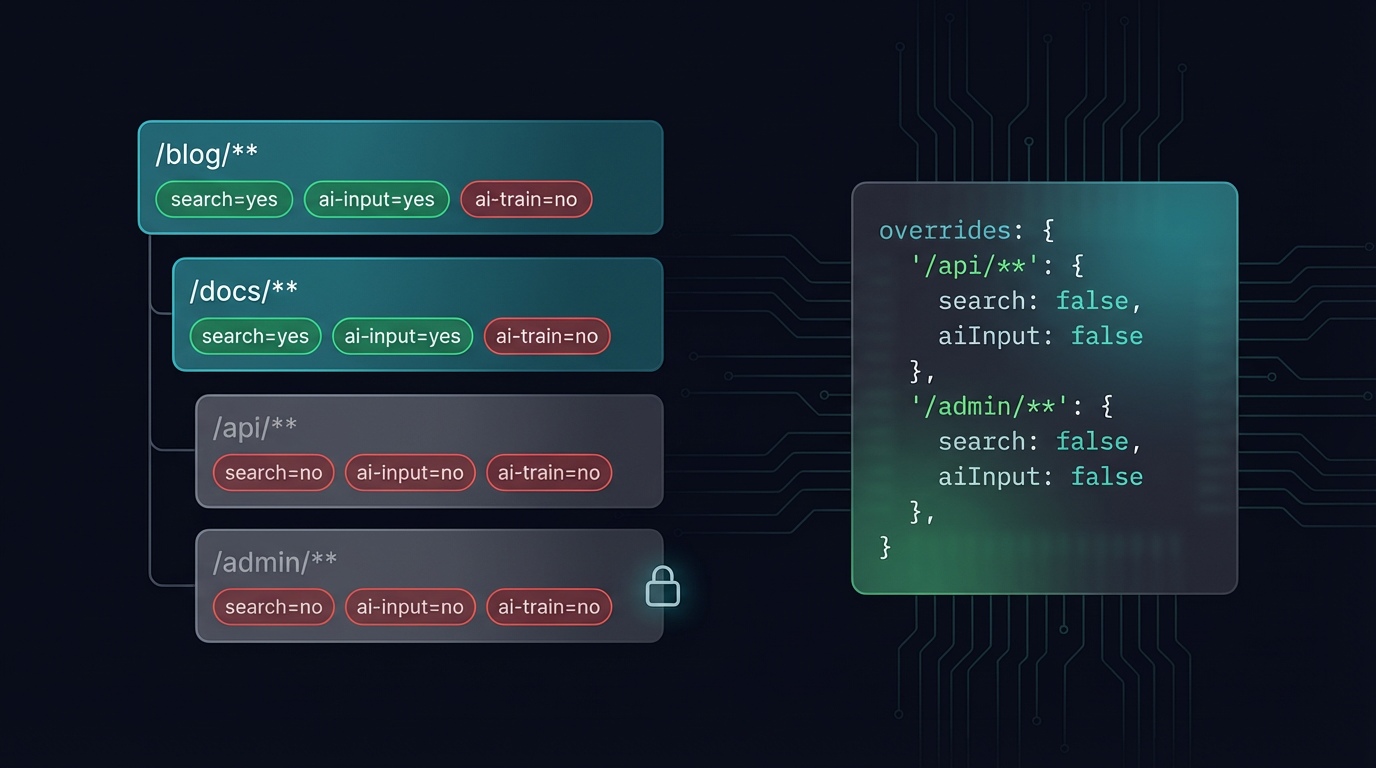
Not every route should have the same AI policy. ContentSignals supports glob-based overrides via picomatch:
app.use(contentsignals({
  signals: { search: true, aiInput: true, aiTrain: false },
  overrides: {
    '/api/**':  { search: false, aiInput: false, aiTrain: false },
    '/blog/**': { aiTrain: false },
    '/admin/**': { search: false, aiInput: false, aiTrain: false },
  },
}));
The first matching pattern wins. Routes that don't match any override use the default signals config. This lets you:
- Block everything for internal APIs —
/api/**getssearch=no, ai-input=no, ai-train=no - Allow search and RAG but block training for blog content —
/blog/**inherits defaults but overridesaiTrain - Lock down admin pages — no AI access at all
On-the-Fly HTML-to-Markdown Conversion
If you don't want to maintain companion files, set convert: true and install the optional dependencies:
npm install turndown turndown-plugin-gfmapp.use(contentsignals({
signals: { search: true, aiInput: true, aiTrain: false },
convert: true,
convertOptions: {
strip: ['nav', 'footer', 'header', 'aside', 'script', 'style'],
prefer: ['article', 'main'],
},
}));When an agent requests markdown and no companion file exists, ContentSignals intercepts the HTML response, strips the noise (navigation, footers, ads), extracts the main content, and converts it to clean GFM markdown with Turndown. The response headers are rewritten to text/markdown with the token count.
Under the hood, the conversion pipeline works by monkey-patching res.write() and res.end() to buffer the HTML output. Once the downstream handler is done, ContentSignals checks the Content-Type, applies the strip and prefer selectors, runs Turndown, and sends the markdown. Status codes, status messages, and downstream Vary headers are preserved correctly through the interception.
Framework Integration
ContentSignals uses the standard Node.js (req, res, next) middleware signature. It works with any framework that supports Express-style middleware, and ships utilities for frameworks that don't.
Express
import express from 'express';
import { contentsignals } from 'contentsignals';

const app = express();
app.use(contentsignals({ signals: { search: true, aiInput: true, aiTrain: false } }));
Fastify (via @fastify/middie)
import Fastify from 'fastify';
import middie from '@fastify/middie';
import { contentsignals } from 'contentsignals';

const app = Fastify();
await app.register(middie);
app.use(contentsignals({ signals: { search: true, aiInput: true, aiTrain: false } }));
Hono (using buildSignal directly)
import { Hono } from 'hono';
import { buildSignal } from 'contentsignals';

const app = new Hono();
app.use('*', async (c, next) => {
  c.header('Content-Signal', buildSignal(
    { search: true, aiInput: true, aiTrain: false },
    undefined,
    c.req.path,
  ));
  c.header('Vary', 'Accept');
  await next();
});
Plain Node.js
import http from 'node:http';
import { contentsignals } from 'contentsignals';

const middleware = contentsignals({
  signals: { search: true, aiInput: true, aiTrain: false },
  staticDir: './public',
});

http.createServer((req, res) => {
  middleware(req, res, () => {
    res.writeHead(200, { 'Content-Type': 'text/html' });
    res.end('<h1>Hello</h1>');
  });
}).listen(3000);
How It's Built
ContentSignals is written in TypeScript, compiled to both ESM and CJS via tsup, and ships with full .d.ts declarations.
Architecture
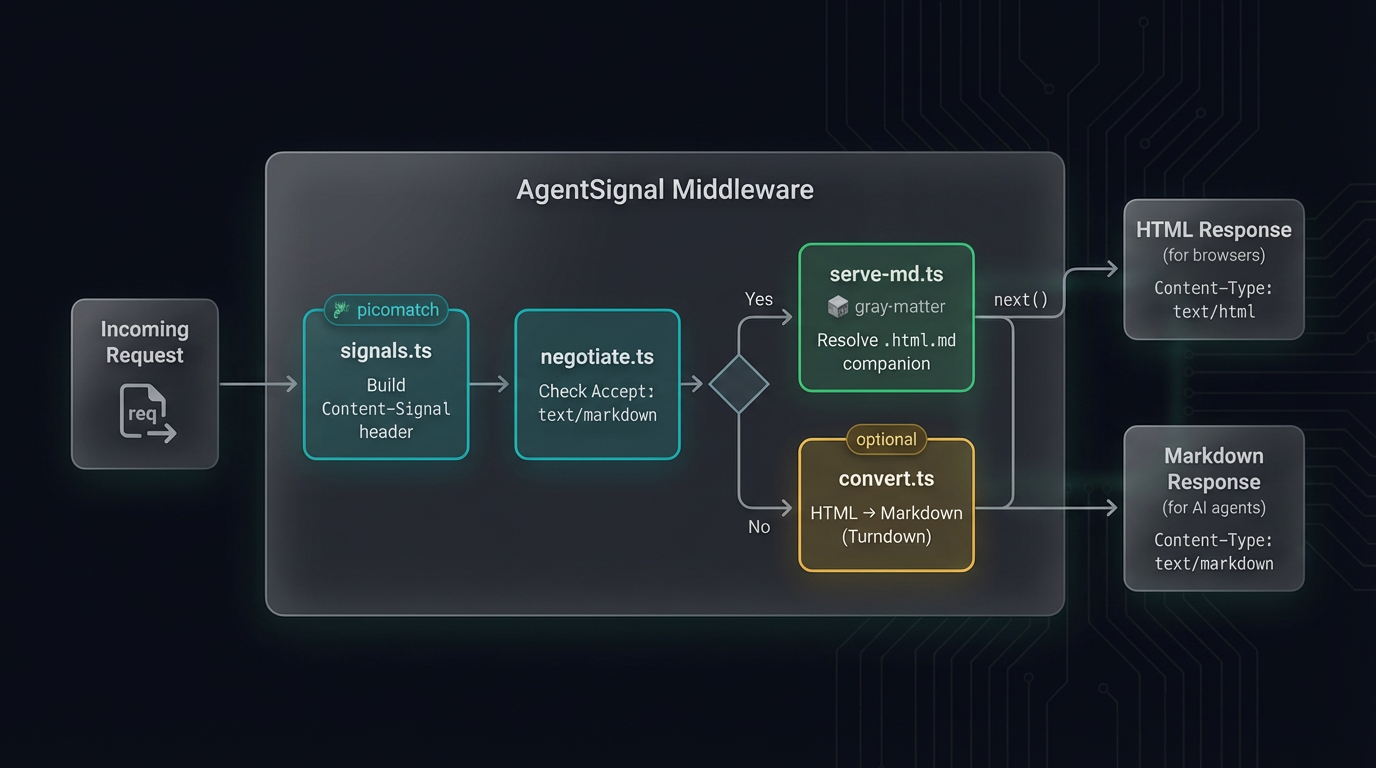
The middleware is composed from four focused modules:
| Module | Responsibility |
|---|---|
signals.ts |
Builds the Content-Signal header string; merges defaults with per-path glob overrides via picomatch |
negotiate.ts |
Checks Accept: text/markdown — explicit preference only, wildcards don't trigger markdown |
serve-md.ts |
Resolves companion files (multi-convention lookup), extracts token count from YAML frontmatter (gray-matter), serves markdown with proper headers |
convert.ts |
Intercepts downstream HTML via res.write()/res.end() monkey-patching, converts to markdown with Turndown, preserves status codes and Vary headers |
Dependencies
- Runtime:
picomatch(glob matching) +gray-matter(YAML frontmatter parsing) — total ~7 KB - Optional:
turndown+turndown-plugin-gfm— only loaded whenconvert: true - Zero framework dependencies — works with raw Node.js
http
Security
- Path traversal protection:
resolveCompanion()checks that resolved paths start with the static directory root using separator-boundedstartsWith— preventing escapes to sibling directories that share a common prefix (e.g.,/var/wwwvs/var/www-backup) - No wildcard markdown:
wantsMarkdown()only triggers on explicitAccept: text/markdown, not*/* - Header integrity:
Varyheader merging preserves downstream values;writeHead()interception captures status codes and messages for correct replay
Testing
45+ tests across four test files, covering header construction, Accept parsing, path traversal prevention, companion resolution, on-the-fly conversion, status code preservation, and Vary header merging. All running on Vitest.
Exported Utilities
Beyond the main middleware, ContentSignals exports lower-level functions for custom integrations:
| Export | Description |
|---|---|
contentsignals(options) |
Middleware factory — the primary API |
buildSignal(defaults, overrides, path) |
Build a Content-Signal header string |
wantsMarkdown(req) |
Check if the request accepts text/markdown |
resolveCompanion(staticDir, path) |
Find the .html.md companion for a given path |
extractTokenCount(content) |
Get token count from frontmatter or estimate |
estimateTokens(text) |
Rough token estimate (~4 chars per token) |
These are useful when your framework doesn't use the standard middleware pattern (like Hono's buildSignal example above), or when you want to build Content-Signal support into a non-HTTP context.
Getting Started
npm install contentsignals- GitHub: github.com/tech-sumit/contentsignals
- npm: npmjs.com/package/contentsignals
- Content Signals Spec: contentsignals.org
- Landing Page: tech-sumit.github.io/contentsignals
The repo includes runnable samples for Express, Fastify, Hono, and plain Node.js — each with its own README and test instructions. Clone, pick a sample, and have Content-Signal headers running in under a minute.
Configuration Reference
The full options interface for contentsignals():
| Option | Type | Required | Default | Description |
|---|---|---|---|---|
signals |
SignalConfig |
Yes | — | Default Content-Signal values applied to every response |
signals.search |
boolean |
No | undefined |
Allow search indexing |
signals.aiInput |
boolean |
No | undefined |
Allow RAG, grounding, generative answers |
signals.aiTrain |
boolean |
No | undefined |
Allow model training or fine-tuning |
overrides |
Record<string, Partial<SignalConfig>> |
No | undefined |
Per-path glob overrides — keys are picomatch patterns |
staticDir |
string |
No | undefined |
Directory containing .html.md companion files |
convert |
boolean |
No | false |
Convert HTML to markdown on-the-fly when no companion exists |
convertOptions.strip |
string[] |
No | undefined |
HTML elements/selectors to strip (e.g. 'nav', '.ad') |
convertOptions.prefer |
string[] |
No | undefined |
Only convert content within these selectors (e.g. 'article', 'main') |
Response Headers
| Header | Value | When |
|---|---|---|
Content-Signal |
search=yes, ai-input=yes, ai-train=no |
Every response |
Vary |
Accept (appended to existing) |
Every response |
Content-Type |
text/markdown; charset=utf-8 |
When serving markdown |
x-markdown-tokens |
<integer> |
When serving markdown |
ContentSignals vs. The Alternatives
| Approach | Scope | Granularity | Markdown Serving | Setup | Cost |
|---|---|---|---|---|---|
| robots.txt | Entire site | Per-URL allow/block | No | Text file | Free |
| Cloudflare Markdown for Agents | CDN edge | Per-zone | Yes (auto-converts) | Cloudflare Pro+ plan | $20+/mo |
| llms.txt | Entire site | Single file | Yes (static) | Text file at root | Free |
| ContentSignals | Application | Per-response, per-route | Yes (companions + on-the-fly) | One app.use() call |
Free (MIT) |
ContentSignals fills the gap between a blunt robots.txt and a CDN-level feature that requires a specific provider. It runs at the application level, gives you per-route control, and works with any Node.js server regardless of hosting.
For most sites, these approaches complement each other: robots.txt for crawler access control, llms.txt for site-wide AI context, and ContentSignals for per-response Content-Signal headers and markdown serving.
Frequently Asked Questions
What is a Content-Signal header?
Content-Signal is an HTTP response header defined by the Content Signals specification. It tells AI agents and crawlers what they may do with your content — whether they can use it for search indexing (search), real-time AI retrieval like RAG (ai-input), or model training (ai-train). Think of it as robots.txt but per-response and more granular.
How is this different from robots.txt?
robots.txt controls whether a crawler can access a URL at all. Content-Signal headers are more granular — they're set per-response and distinguish between search, AI input (RAG/grounding), and AI training. A page might allow search and RAG but block training. You can't express that in robots.txt. The two work together: robots.txt is the front door, Content-Signal is the per-room policy.
What about llms.txt?
llms.txt is a static file at your site root that provides general context about your site for LLMs — who you are, what you do, key pages. It's a great complement to ContentSignals. ContentSignals operates at the HTTP response level: per-route signal headers and markdown content negotiation. Use both: llms.txt for site-wide context, ContentSignals for per-page policy and content delivery.
What is content negotiation and why does it matter for AI agents?
Content negotiation is an HTTP mechanism where the client says what format it prefers (via the Accept header) and the server responds accordingly. AI agents prefer markdown over HTML because it's cleaner, smaller, and doesn't contain layout noise like <nav>, <footer>, and CSS classes. When an agent sends Accept: text/markdown, ContentSignals serves the markdown version instead of HTML — same URL, different representation.
What is a .html.md companion file?
It's a markdown version of an HTML page, placed alongside the original in your static directory. For about.html, the companion is about.html.md. You write it once (or generate it at build time), and ContentSignals serves it to agents that request markdown. The companion can include YAML frontmatter with a tokens field for accurate token counting.
Do I need to create .html.md files for every page?
No. You have three options depending on your needs:
- Companion files only — create
.html.mdfiles for important pages (setstaticDir). Best for curated, high-quality markdown. - On-the-fly conversion — set
convert: trueand ContentSignals converts HTML to markdown automatically using Turndown. Good for sites with many pages where manual companion creation isn't practical. - Headers only — skip
staticDirandconvert, and ContentSignals only adds Content-Signal headers. No markdown serving. Useful when you only need the signal policy without content negotiation.
What is the x-markdown-tokens header?
It tells AI agents how many tokens the markdown response contains, so they can budget their context window before downloading the full body. The count comes from the tokens field in YAML frontmatter, or is estimated at ~4 characters per token (aligned with GPT-4's cl100k_base tokenizer average) if not specified.
Does ContentSignals work with Next.js, Nuxt, or other meta-frameworks?
ContentSignals is framework-agnostic — it uses the standard Node.js (req, res, next) signature. For Next.js, use it in a custom server or API route middleware. For Nuxt, use it as server middleware. For any framework that supports Express-style middleware, it's a single app.use() call. For frameworks with different middleware patterns (like Hono), use the exported buildSignal() utility directly.
What happens if turndown is not installed and convert is true?
ContentSignals throws a clear error: "contentsignals: on-the-fly conversion requires turndown and turndown-plugin-gfm." Install them with npm install turndown turndown-plugin-gfm. If you only use companion files or headers-only mode, these packages are not needed.
What's the performance impact?
- Headers only: negligible — two
setHeadercalls per request - Companion files: near-zero overhead — a synchronous file existence check and
readFileSync - On-the-fly conversion: Turndown adds processing time proportional to HTML size. For production, cache the output at the application or CDN layer
The middleware itself adds no dependencies beyond picomatch (~2 KB) and gray-matter (~5 KB).
Is this related to Cloudflare's "Markdown for Agents" feature?
Yes — both implement content negotiation for AI agents. Cloudflare's feature does it at the CDN edge for Pro+ customers. ContentSignals does it at the application level for any Node.js server. If you're already on Cloudflare Pro+, you may not need ContentSignals for markdown serving, but you'd still use it for Content-Signal headers with per-path overrides — something Cloudflare's feature doesn't offer.
What Node.js versions are supported?
Node.js 18 and above. The package ships dual ESM + CJS builds, so it works with both import and require.
Can I use contentsignals with TypeScript?
Yes. ContentSignals is written in TypeScript and ships with full .d.ts and .d.cts type declarations. All config options have JSDoc annotations. The ContentSignalsOptions, SignalConfig, ConvertOptions, and Middleware types are all exported.
AI agents are already crawling your site. The question is whether you're telling them anything about what they're allowed to do with what they find. One middleware call changes that.